
Simplify check-in for everyone with customized patient intake software
Don’t let care visits be all about paperwork. Discover how CheckinAsyst’s patient intake software streamlines check-in for patients and optimizes operations for your staff. With intelligent workflows and digital tools, you can minimize wait times, boost patient satisfaction, and see more patients – without all the hassles.
All the digital tools you need to manage patient intake operations

Modern digital patient check-in modes
From mobile pre-registration to flexible, in-office check-in options

Automated patient data capture
Intelligent workflows to automatically collect the right data, at the right time

Eligibility verification & payments
Faster way to verify insurance and collect co-pays, balances & more

Bi-directional integration with your EHR
All patient data & medical info captured into the EHR automatically

Data-driven insights for patient intake
From intake metrics to performance trends – everything you need to optimize processes
A faster, convenient way for patient check-in
No delays. No confusion. No stress – CheckinAsyst helps deliver a modern check-in experience your patients deserve. From patients filling out forms on their own time to making payments using convenient channels, explore our user-friendly digital tools that ensure your intake process is simple, quick, and hassle-free.
Mobile-first approach
A zero hardware, zero investment approach – better convenience for patients, less hard work for staff.
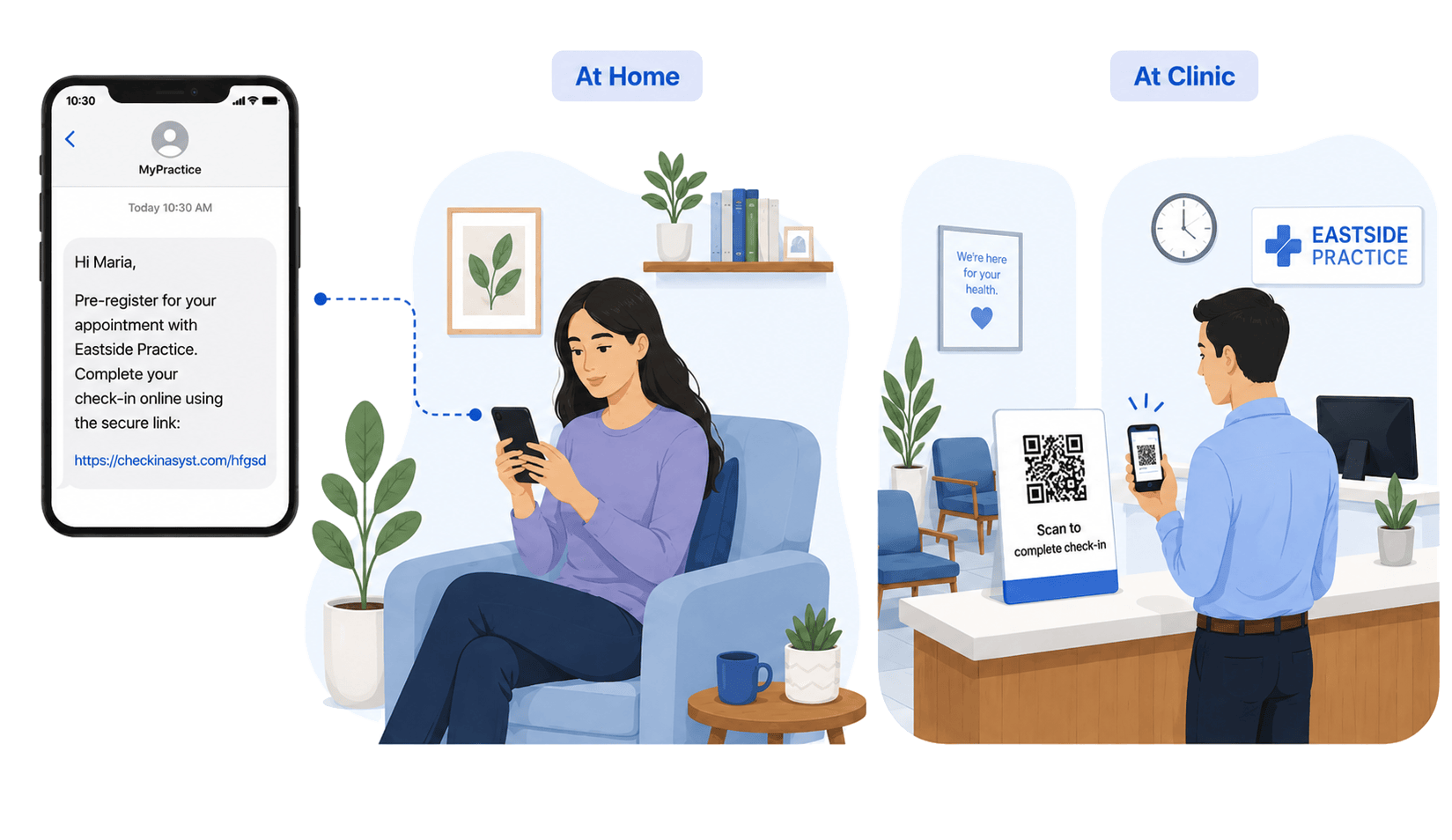

In-office modes
Modern check-in options for capturing all the necessary information and speed up your intake process – without crowding your front office.
75% reduction
in patient wait times using digital check-in modes
20 mins saved
in patient wait times using digital check-in modes
Smart workflows to capture the right patient data
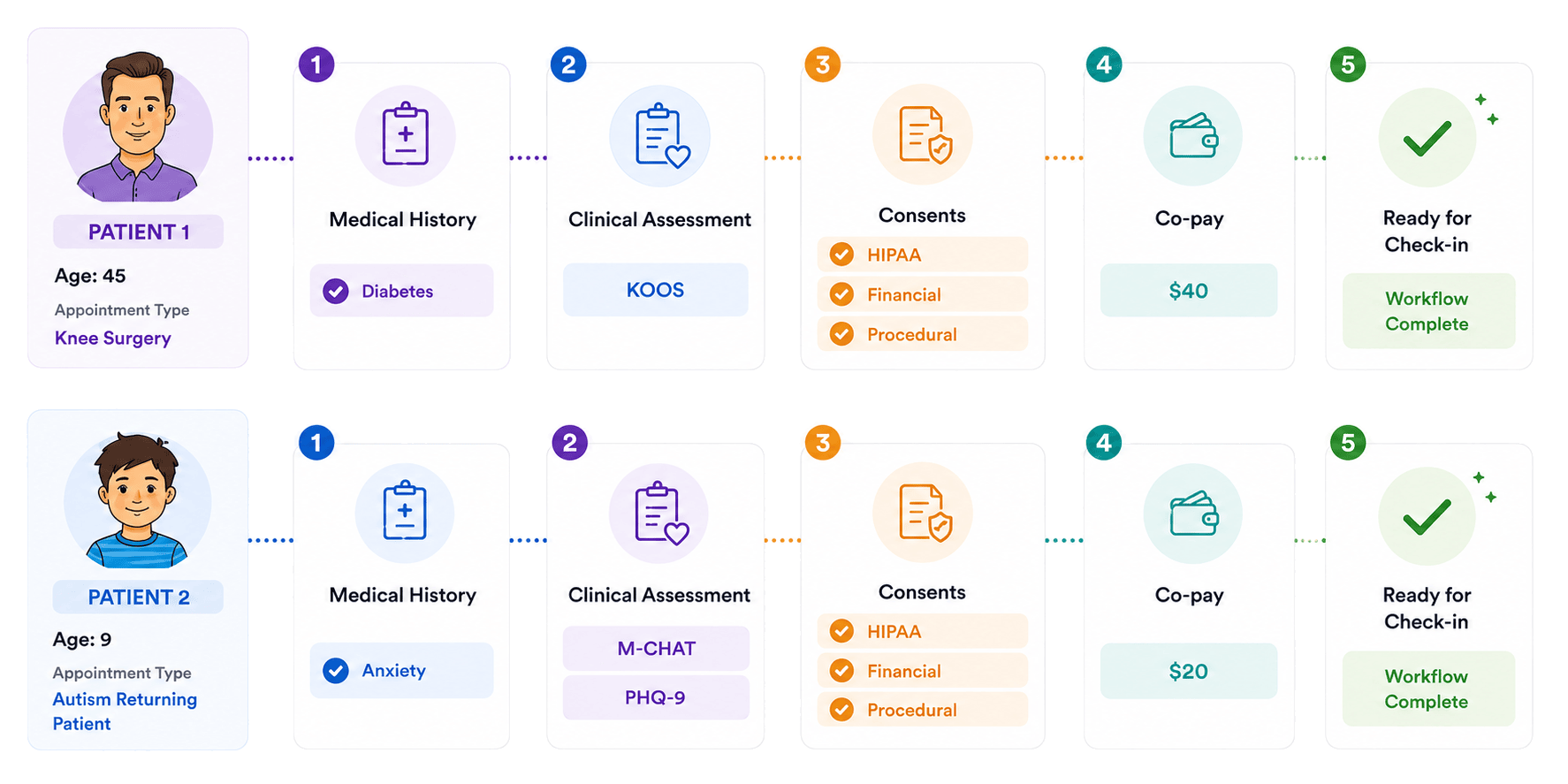
A digital platform should simplify operations, not add to the complexities. CheckinAsyst’s intelligent, rule-based workflows automate all the manual work of asking the right questions while ensuring the flexibility your staff needs. Set up workflows by considering specific parameters to help minimize staff intervention. And for ad-hoc situations, your staff can easily add forms on the fly to maintain a 100% digital workflow.
- Logic-based workflows to collect relevant information based on the patient history and appointment types
- Patient info includes demographics, clinical history, medications, allergies, and more.
- Specialty-specific clinical assessments including PHQ-2/9, ASQ-3, M-CHAT, GAD-7, HOOS, KOOS, and more
- Consent for HIPAA, financial policies, medical procedures, and more
10X improvement
in collecting medical history
Powerful Dashboard to control the intake chaos
Your front desk staff juggles multiple tasks every day. Empower them with a 360-degree view of all the patient intake operations and the right digital tools to manage them seamlessly – all from our patient intake software.
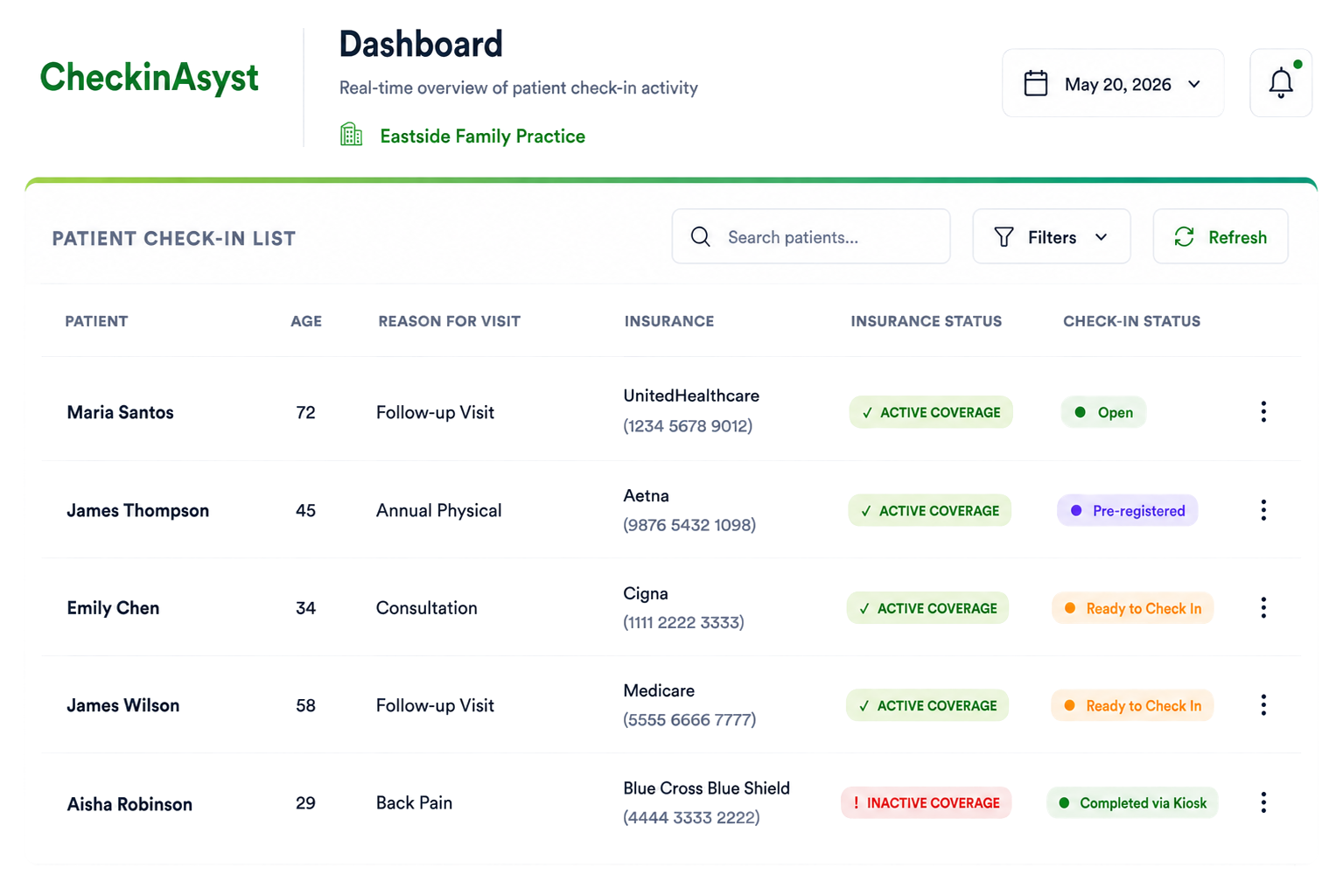
- Check-in status track: See patients who have arrived, filled out forms, and are ready to see the provider.
- Insurance details: Access patient insurance info and run real-time checks – even for walk-ins.
- Patient payments: Collect co-pays, balances, and fees for additional services with ease.
- Consent management: Maintain required documents and track expiring consents for accurate records.
- Patient records: View patient info like demographics, clinical history, and assessments to better prepare for each visit.
- Appointment updates: Monitor visit confirmation, cancellation and rescheduling requests from the Dashboard.
- Patient communication: Send appointment & payment reminders, secure messages, and more – all from one place.
- Payment plans: Enroll patients into payment plans, review pending balances, and manage dues effortlessly.
90% reduction
in manual entries and scanning efforts
60% increase
in co-pay and balance collection
Improve practice efficiency with intelligent insights
Take out the guesswork and rely on data-driven insights to drive real impact. From monitoring check-in patterns, eligibility verifications to payment collection and appointment statuses, gain full visibility into your operations to optimize workflows, enhance patient care, and drive higher ROI.
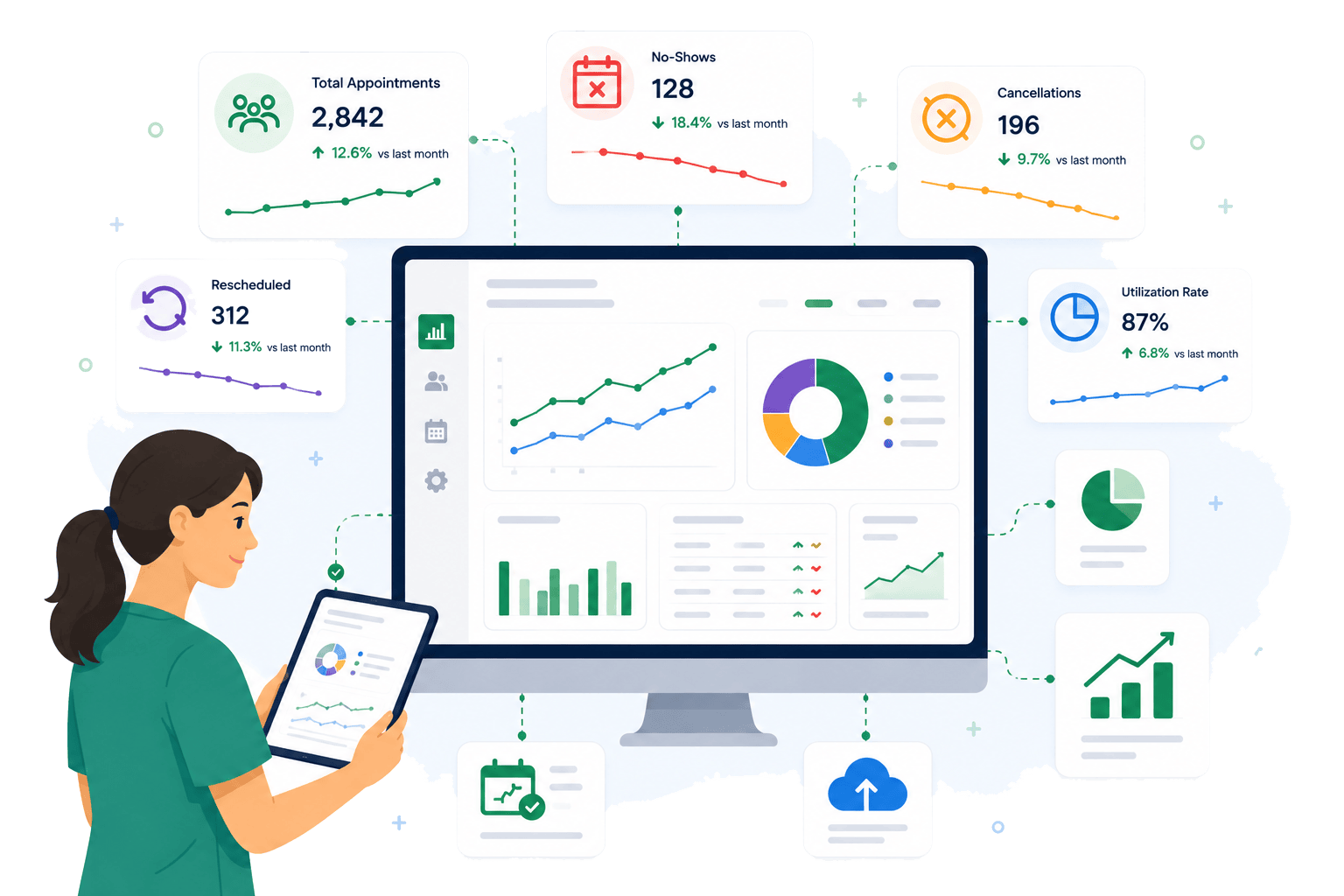
- Check-in trend: Monitor usage of different check-in modes to understand patient behavior.
- Appointment insights: Optimize schedules by monitoring no-shows, cancelations, and rescheduled visits.
- Eligibility checks: Track how many patients have confirmed coverage or uninsured insurance.
- Assessment engagement: Measure the completion rates of assessment forms to improve data collection.
- Communication performance: Assess the deliverability of reminders and patient messages to measure impact.
- Operational efficiency: Compare different providers and locations to identify gaps and improvement areas.
- Platform utilization: Evaluate how effectively patients and staff are using CheckinAsyst to boost ROI.
- Payment collection: Gain visibility into collections and missed opportunities to boost financial performance.
Why Customers love our patient check in software

“Previously, our staff used all paper and manually input individual medical history data into our EMR. Thanks to CheckinAsyst’s clinical integration, when patients share their clinical history, it seamlessly goes into the EMR. The system has streamlined our processes and allowed us to focus on more meaningful tasks for our patients and providers.”
– Steven Cruze, Chief Operating Officer

“With our previous intake tool, patients spent 30 minutes filling out forms, then our MAs spent extra time documenting that information in the encounter – It simply didn’t make sense. Switching to CheckinAsyst has not only saved us time and resources, but has also greatly improved the overall experience for both our patients and staff.”
– Cindy Papke, Clinical Administrator

Beyond intake: What makes CheckinAsyst different

Customizable workflows built to match your specialty, staff capacity, and dynamic needs

Flexibility to digitize processes one at a time & scale as you grow – without overwhelming your staff

Dedicated customer support that starts from implementation, go-live, throughout your lifecycle

Secured, reliable patient check in software that offers seamless experience for your staff and patients
How our patient intake software works for your practice
Setting up a modern-day practice is easier than you can imagine. Our patient intake software seamlessly integrates with your existing PM or EMR system to support its rich functionalities.
Here’s how it works:

Ready to Transform Your Patient Intake Process?
Request a demo today
Frequently Asked Questions (FAQs)
How can I choose the best patient intake software for my clinic?
Choosing the best patient intake software for your clinic depends on how well the system supports your front desk, clinical workflows and patient experience. The best patient intake software reduces paperwork; lowers wait times and provides staff with accurate patient information before the visit.
Key features to evaluate include:
- The software should support both digital pre-registration and in-office check-in
- Look for EHR/PM integration capabilities to ensure automated data capture
- Confirm if the integration doesn’t have PDF-only and partial data posting which leads to more manual work
- Check flexibility in configuring workflows based on visit type and specialty
- See the options available for reminders, secure chat, and broadcast messaging
- Analyze HIPAA-compliance and security standards followed by the software
How does automated patient intake improve clinic efficiency?
Automated patient intake improves clinic efficiency by replacing paper forms and manual data entry with digital workflows. This results in staff spending less time on administrative tasks and more on patient care.
Key features to evaluate include:
- Less manual work: Patient data posts directly into the EHR, eliminating re-entry and reducing errors
- Shorter wait times: Patients submit information before arrival, reducing front-desk congestion
- Faster patient throughput: Smoother intake means better appointment flow throughout the day
What are the benefits of a digital intake process?
A digital intake process improves the patient registration experience while reducing front-desk workload. Patients submit their information digitally before the visit, speeding up check-in and reducing paperwork.
Key benefits of a digital intake process include:
- Shorter check-in times for patients
- Less manual data entry for staff
- More accurate patient information with required fields
- Automatic upload of intake data into the EHR
- Better patient experience with mobile-friendly forms
What are the main steps in patient intake?
The main steps in patient intake involve collecting patient information, verifying details, and preparing the visit.
A standard patient intake workflow includes:
- Self-scheduling appointments through phone, website
- Necessary forms are automatically sent to the patients
- Patient intake forms are completed digitally or in the clinic
- Collection of demographic and medical history information
- Insurance details captured and verified
- Consent and policy forms signed digitally
- Co-payment or outstanding balance collected
- Patient records updated in the EHR